Adding FAQs to products
Add frequently asked questions to your products to help customers and boost SEO.
Open the product editor
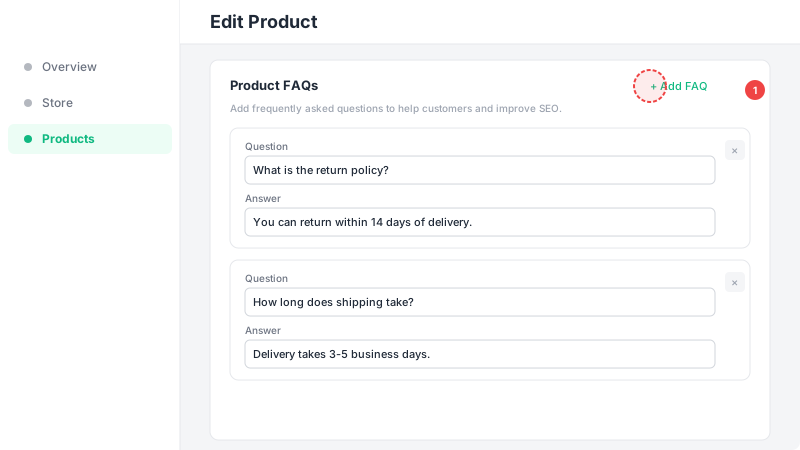
Go to Products in the sidebar and click on any product to edit it, or create a new product. Scroll down to the "Product FAQs" section — you'll see it between the stock settings and product options.
Add questions and answers
Click "+ Add FAQ" to add a new question-answer pair. Enter a clear, concise question (up to 200 characters) and a helpful answer (up to 1000 characters). You can add as many FAQs as you need. Common product FAQs include shipping times, return policies, sizing guides, care instructions, and product materials.
Save and preview
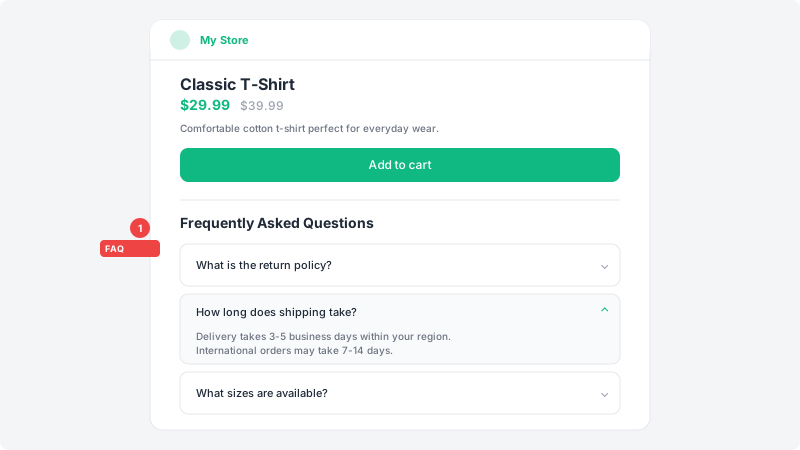
Click "Save" to publish your FAQs. They will appear as an expandable accordion section on your product page. Each FAQ is also automatically marked up with FAQ schema (JSON-LD), which helps search engines display your questions and answers directly in search results — giving your product page more visibility.