

Connecting a custom domain
Use your own domain name for your store.
1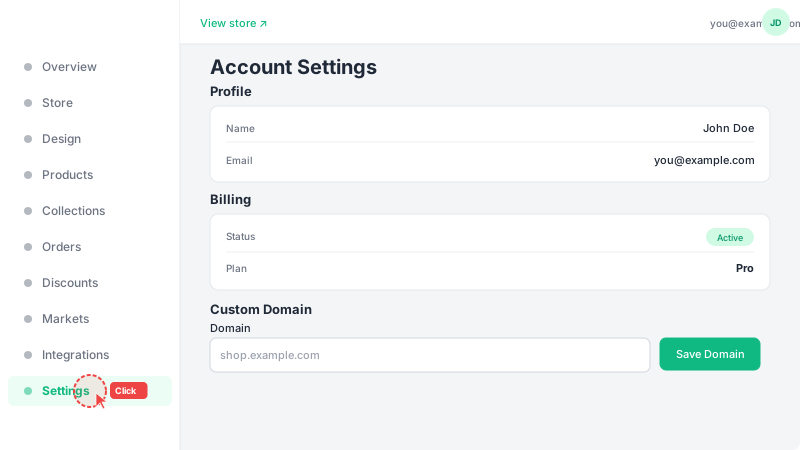
Go to Store page
Navigate to Store from the sidebar and scroll down below the store settings form to find the "Custom Domain" section. A custom domain lets customers visit your store using your own brand name (e.g., shop.yourbrand.com) instead of the default leadivo.app link.
2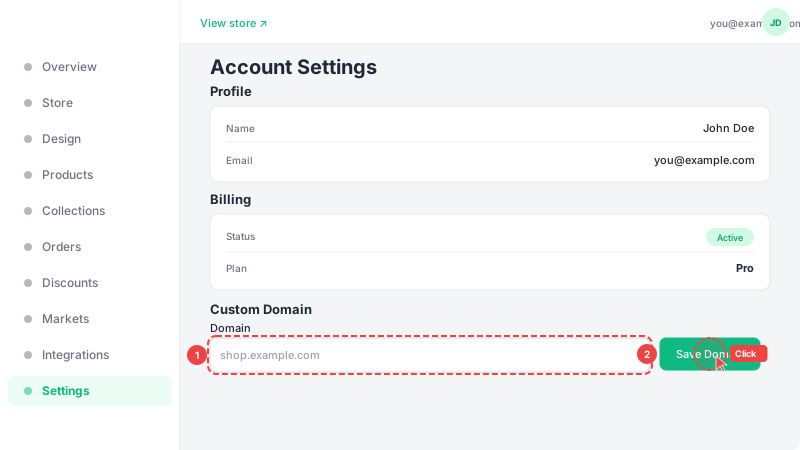
Enter your domain
Type your domain name in the field (e.g., shop.yourbrand.com) and click "Save Domain". You'll need to add a CNAME record in your domain registrar's DNS settings pointing to leadivo.app. DNS changes can take up to 24 hours to propagate, so your domain may not work immediately.
Frequently Asked Questions
What type of DNS record do I need?
You need to add a CNAME record pointing your custom domain (e.g., shop.yourbrand.com) to leadivo.app. This is done in your domain registrar's DNS settings (GoDaddy, Namecheap, Cloudflare, etc.).
How long does DNS propagation take?
DNS changes can take anywhere from a few minutes to 24 hours to propagate worldwide. Most changes are visible within 1-2 hours. During this time, your custom domain may not work immediately.
When can I connect a custom domain?
You can connect a custom domain as part of your Pro subscription. During your 14-day free trial, you have full access to this feature so you can set everything up before going live.