

COD analytics dashboard
Track confirmation rate, delivery rate, return rate, and revenue by status.
View COD KPIs
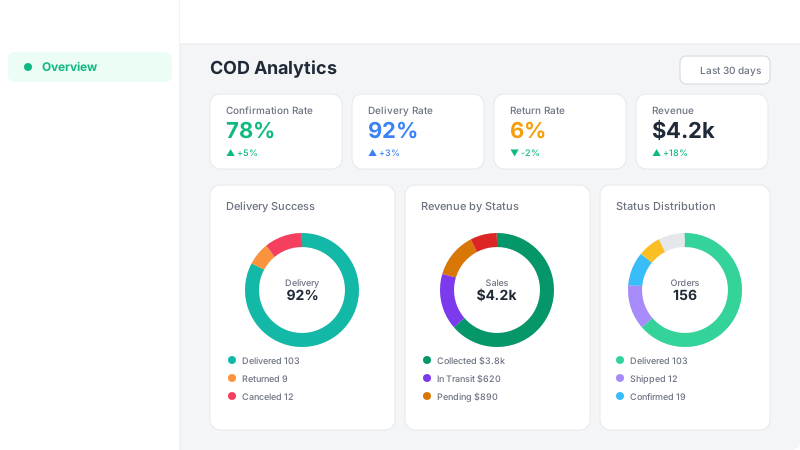
Your dashboard shows three COD-specific metrics: Confirmation Rate (percentage of orders confirmed out of total), Delivery Rate (percentage of shipped orders that were delivered), and Return Rate (percentage of shipped orders that were returned). Each metric includes a mini chart showing the trend over your selected date range and a comparison with the previous period.
Explore the donut charts
Below the KPIs, you'll find three donut charts. The Delivery Success chart shows the breakdown of delivered, returned, and canceled orders. The Order Status Distribution chart shows how your orders are split across all statuses (pending, confirmed, shipped, delivered, returned, canceled). These visual breakdowns help you spot patterns at a glance.
Analyze revenue by status
The Revenue by Status donut chart breaks down your revenue into four categories: Collected (delivered orders — money you've received), In Transit (shipped orders), Pending (pending and confirmed orders), and Lost (canceled and returned orders). The center shows your total sales, and the legend displays the exact amount for each category. This tells you how much money you've actually collected versus what's still at risk.