

Managing your account
Update your profile, email, and password.
1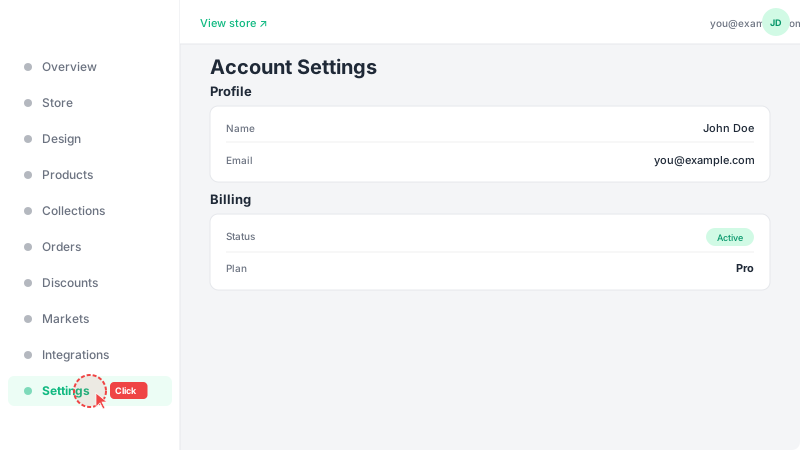
Open Settings
Click "Settings" at the bottom of the sidebar. This page shows your account profile, billing status, and custom domain configuration. Your profile information is separate from your store information — profile details are for your account, while store details are what customers see.
2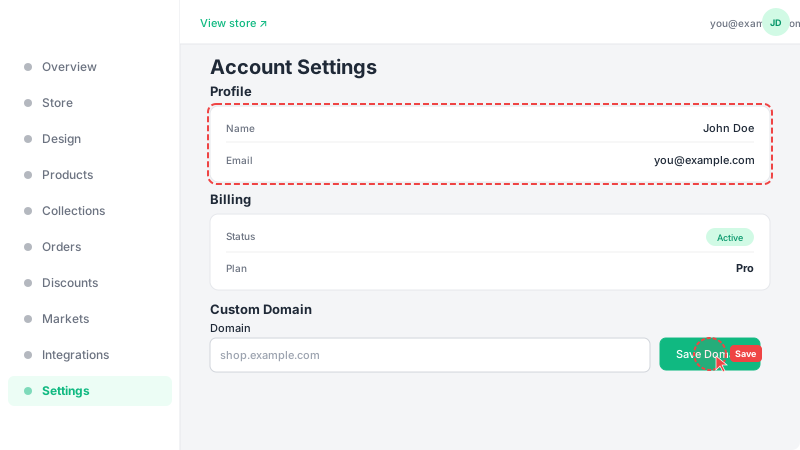
Update your details
In the Profile section, you can update your display name and email address. Your billing status and current plan are shown in the Billing section. If you have a Pro plan, you can also connect a custom domain at the bottom of this page — enter your domain name and click "Save Domain". Remember to click "Save" after making any changes to your profile.
Frequently Asked Questions
How does Leadivo pricing work?
Leadivo offers a 14-day free trial with full access to all features. After the trial, you subscribe to the Pro plan to keep your store running with all features including custom domains, integrations, and unlimited products. You can view your billing status and subscription details in the Settings page.
Can I cancel my Pro subscription?
Yes, you can cancel your Pro subscription at any time from the Settings page. Your Pro features will remain active until the end of your current billing period.
How do I reset my password?
If you forgot your password, click the "Forgot password" link on the login page. You'll receive a password reset email with a link to create a new password. If you signed up with Google, no password is needed.