Creating a discount code
Set up promotional discount codes for your customers.
Go to Discounts
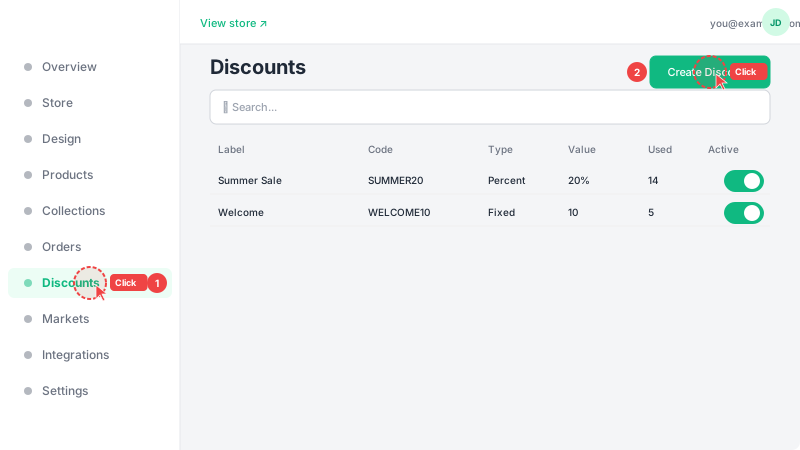
Click "Discounts" in the sidebar to see your existing discount codes, then click "Create Discount" to make a new one. Discount codes are a great way to attract new customers, reward loyal ones, or run promotional campaigns on social media.
Configure the discount
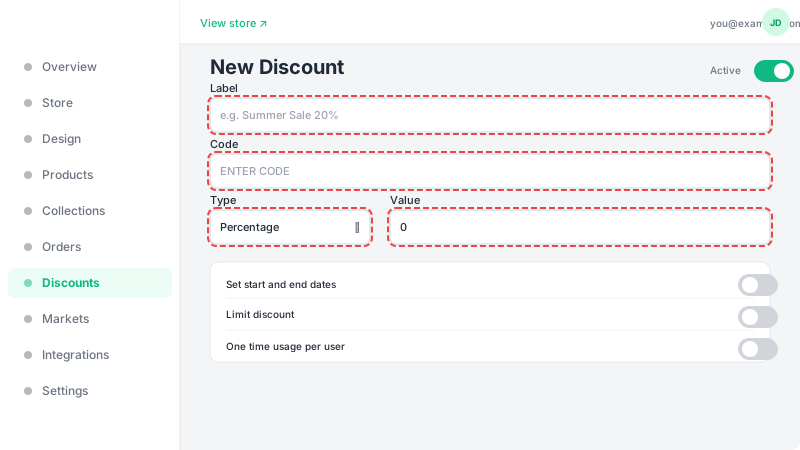
Enter a memorable code that customers will type at checkout (e.g., SUMMER20, WELCOME10). Choose the discount type: "Percentage" takes a percentage off the total (e.g., 20% off), while "Fixed amount" subtracts a specific value (e.g., $5 off). Set the discount value, and optionally configure: a minimum order amount (the discount only applies if the cart total reaches this amount), and a usage limit (how many times the code can be used before it expires). Click "Create" to save the discount.